 AIFeed
Letting an AI agent work while you walk away sounds reckless.
The concern is warranted. There are plenty of stories of AI building fragile software with glaring security holes. Agents have also made reckless decisions on their own, like dropping a production database.
It’s sensible to be wary, but don’t dismiss the idea. With the right guardrails and practices in place, you can safely hand work to agents and step away while they do it, shipping high-quality software at a much faster pace. Even in security-sensitive environments, the same approach applies, although you need to be deliberate about where the agent runs and what code leaves your network.
The catch is that the effort doesn’t disappear with asynchronous agents. It shifts to planning before the agent starts and reviewing what it produces. In this article, I’ll cover what it takes to work with asynchronous agents safely and get quality output from them. I won’t compare particular tools or models, since these advance quickly. Instead, I’ll focus on concepts and practices that apply regardless of harness (the tool that runs the agent) and model. Any tools I do mention are just examples I’ve used myself.
What Is Asynchronous Agentic Development?
Most developers started out using AI for coding in a chat window, either in the browser or as a side panel in their IDE. When these chat tools first arrived, they were mind-blowing. AI agents, though, are so much more than a simple chat interface. An agent can read context, make decisions, and take actions on your behalf, like writing code or debugging an application.
How you work with an agent can be synchronous or asynchronous. In a synchronous setup, you watch the agent work in real time, answering its questions and steering it as it goes. In an asynchronous setup, you hand it a task and walk away. You come back to a pull request that’s ready for review.
Removing that hands-on control lets you scale your effort by running multiple agents in parallel, so you can get through far more work in the same amount of time.
Working asynchronously changes what the quality of the resulting code depends on. When you work synchronously, you’re the safety net. You notice the agent drifting, correct it mid-task, and catch mistakes as they happen. When you work asynchronously, nothing catches a mistake until the work is done, so the result depends on what you set up beforehand: how clear your specs are, how safe your environments are, and how good your checks are.
Here’s what that looks like in practice:
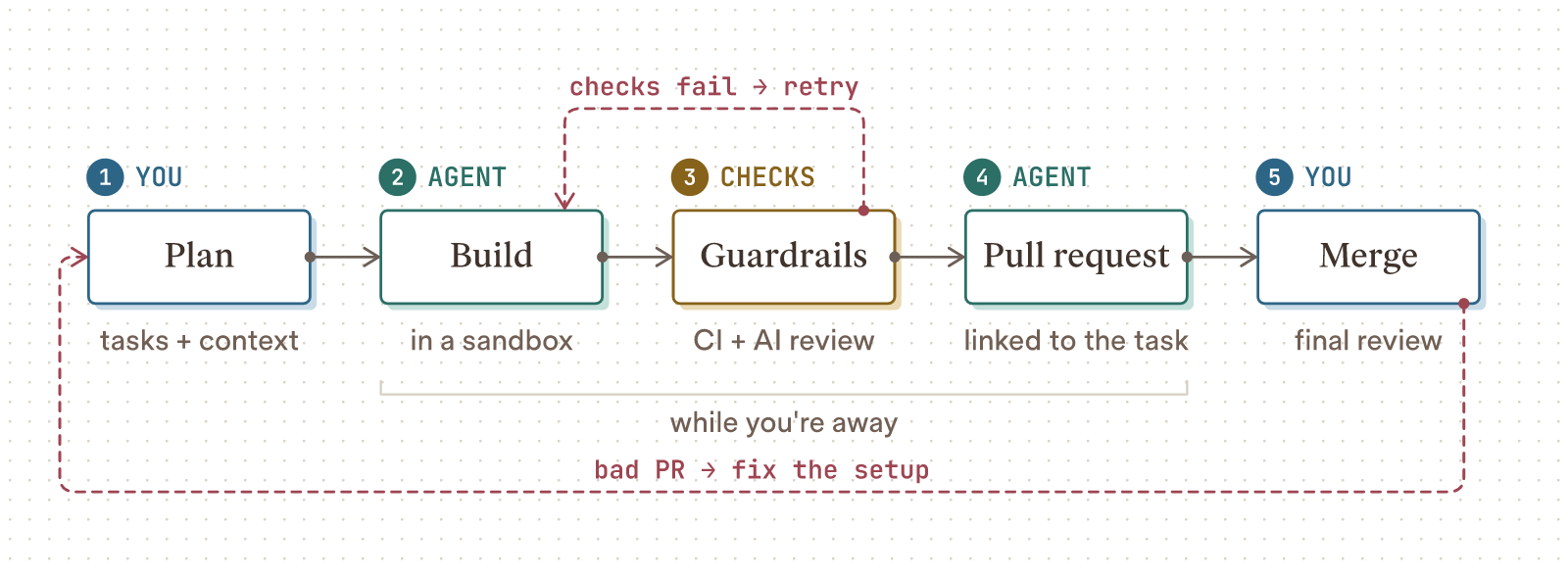
Read the diagram from left to right. You plan the work and its context. The agent implements it in a sandbox, running tests as it goes. Pipeline checks and an AI-powered review verify the pull request, and then you review it and merge. If something is off, you send it back to the agent. If the same wrong assumption keeps appearing, you update the steering files so it’s corrected for every future task.
The workflow doesn’t remove the human from the loop. It moves your attention to the two points that matter most: the plan before the agent starts and the pull request when it finishes, rather than every step in between.
That means letting go of some control, which isn’t easy when you have strong preferences about how code is formatted and structured. As someone who’s opinionated about code style, I found this challenging at first. But you aren’t lowering your standards, you’re moving them out of your head and into explicit guardrails. For the standards you care about, you set up linters and formatters in CI and let the pipeline enforce them. For the rest, like whether a brace goes on a new line, you accept that it no longer matters.
When Not to Work Asynchronously
Asynchronous work suits tasks you can fully specify up front. It’s a poor fit when you can’t write the acceptance criteria yet. Exploratory work, such as prototyping with an unfamiliar library, investigating a hard-to-reproduce bug or settling a design question, depends on your feedback, and an agent working alone will fill the gaps with guesses. Do that work synchronously, and turn what you learn into decisions and tasks that you can delegate.
Less Risky Than It Looks
An asynchronous agent is only as risky as the access you give it.
If your environment isn’t set up correctly, nothing stops an agent from reading sensitive files like your SSH private key and sending it to a remote server with a cURL request. Or, an agent might send a PR with broken code and merge it in automatically without any human review or automated checks. If you don’t have pipelines or automated checks, you’ll miss potential secrets being committed or malicious packages being installed.
Approving every action by hand isn’t the fix either. Your attention fades the longer a session runs, and by the fiftieth approval you’re barely reading what you’re approving. Rules don’t fade, so the safer approach is to enforce them automatically and let the agent work within them.
Most of those controls are ones a security team already expects for human developers: branch protection and required reviews stop broken code from merging on its own, and pipeline checks catch committed secrets and malicious packages. That’s what makes this approach workable in security-sensitive environments. Agents add a couple of new risks. One is that they can be steered by text they read, so the sandbox has to assume a hijacked agent and leave it with no production credentials and a restricted network. Another is that they can optimise for a green pipeline rather than correct behaviour, so the tests need protecting too.
The rest of this article walks through a workflow that builds those rules in at every stage, from planning the work to reviewing the pull request.
Plan Before You Delegate
Working with asynchronous agents shouldn’t involve delegating all architectural decisions to the agent itself. You’re still responsible for the final output, and the only way of ensuring it aligns with your long-term vision for the project is to plan thoroughly before delegating work.
Make the Technical Decisions Yourself
Your role as a software developer shifts from writing code to knowing how to architect and design the codebase. The agent can write code syntax, but it’s important that you still make the technical decisions yourself.
Why? Because every technical decision comes with tradeoffs. There’s no silver bullet. You’re far more aware of the long-term vision for the project and are the best person to decide which technical decisions align with that vision.
Some of these decisions include picking the right technology stack that best supports your future goals. If you have licensing requirements, you need to pick the dependencies that align with those requirements. If your software has a public API, you should be the one deciding what the endpoint contracts should look like. Of course you can (and should) use AI to help you research these decisions, but you are the one who makes the final call.
Once you’ve made a decision, write it down along with the reasoning behind it, even if it’s just a few lines in an architectural decision record (ADR) in your repository. That way, the agent implements the decision instead of second-guessing it, and your tasks can point back to it. From my experience, it also stops future agents from going back to a previous option that we deliberately steered away from.
Any open question you don’t answer will be answered by the agent. And with the agent’s limited context and knowledge, that decision is usually the wrong one.
Break Down the Work Logically
Once the decisions are made, have the agent propose a breakdown of the work to be done and then refine it yourself. Review the list before any code gets written. A bad split is far more expensive after the agent has already started working on the codebase.
When breaking down the work, slice it vertically, not horizontally. A horizontal split gives you tasks like “add the Payment entity”, “add the payment service”, and “add the payments controller”. None of those can be tested on their own, and no reviewer can tell whether they’re right until all three land. A vertical slice delivers something testable end to end. For the payments feature, that might look like this:
- Record a full payment against an invoice (domain rule, handler, endpoint, and tests).
- Support partial payments and track the outstanding balance (after 1).
- Reject payments on voided invoices (after 1).
- Add an endpoint that lists an invoice’s payments (after 1).
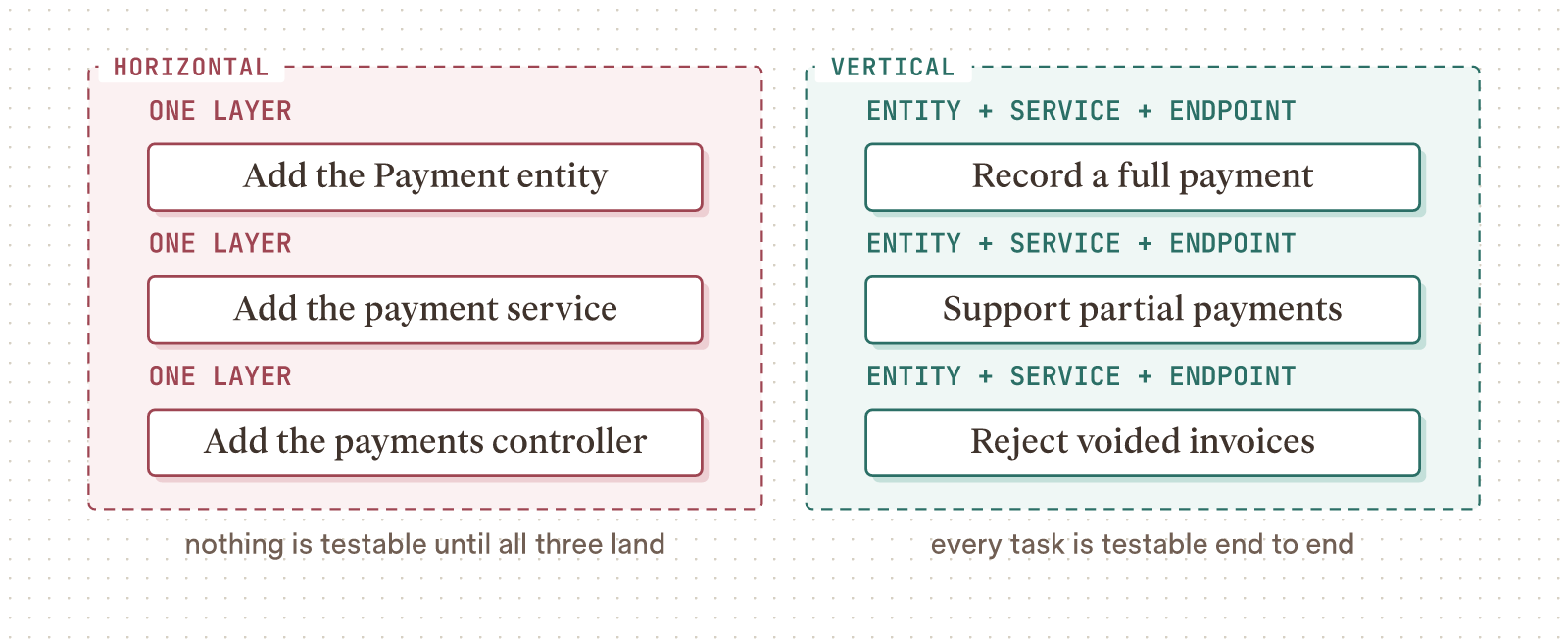
Each task above is a complete unit of work that can be tested independently of the others. Slices 2, 3 and 4 only depend on the first one, so once it lands, three agents can work on them in parallel. They will likely touch some of the same files, like the Invoice entity, so list the files each task is expected to change and sequence any that overlap. The tasks should be sized so that an agent can easily implement them in a session with optional subagents to delegate work to. It should also result in PRs that are small enough to be reviewed by a human in a timely manner.
When I first started working with multiple agents asynchronously, I ran into a number of merge conflicts. They would take two to three times longer to resolve than the actual task implementation took. It made me realise the importance of upfront technical planning of tasks. Having a clear, well-defined task with clear blockers and dependencies, along with a list of existing files that the task will most likely touch, helped me avoid ugly merge conflicts down the line.
Write Well-Defined Tasks
Each slice from the breakdown becomes a task. A well-sliced task isn’t automatically a well-defined one. A task is well-defined when an agent can finish it without needing additional answers from you halfway through the process that would change the architecture or outcome.
Most of us would write the task for a colleague like this:
图表:Markdown
        Title: Add payments to invoices

Customers should be able to pay invoices. Add a REST
endpoint to support this.
This was never a good ticket for a human either. Your colleague just absorbs the cost, either by asking you follow-up questions or by drawing on experience from similar features they’ve built and their knowledge of your domain and standards. An agent has neither. It will fill the gaps with its own assumptions, and some of those will be wrong simply because it lacks the background.
An agent needs more than a single vague sentence. The task description should give it the relevant context, set a clear scope so it neither over- nor under-engineers the solution, and state the acceptance criteria that define “done”. The ticket above should look more like this:
图表:Markdown
        Title: Record a full payment against an invoice

## Context
Part of the "Invoice payments" feature. It should follow
the decision made in ADR-0007 where payment initiation is
a sub-resource of an invoice on the REST API. Amounts are
always decimal numbers with up to two decimal places.

## Scope
- Add `POST /invoices/{invoiceId}/payments` for a single
  payment that settles the invoice in full.
- Add a Payment entity (Domain), a `RecordPayment` command
  and handler (Application), and the endpoint (API).

## Acceptance Criteria
- Returns a 201 Created with the created payment identifier.
- The invoice moves from "Sent" to "Paid" when the payment
  succeeds. The payment amount must equal the outstanding
  invoice balance.
- Returns a 404 Not Found if the invoice does not exist.
- Returns a 422 Unprocessable Entity if the invoice is a
  draft, is already paid, or the payment amount does not
  equal the outstanding invoice balance.
- Domain rules are covered by unit tests, and the endpoint
  by integration tests against a test database.

## Out of Scope
- Partial payments, refunds, payment history and payment
  notifications.
This ticket defines what the agent should and shouldn’t do, and what success looks like.
This might look overwhelming to write, but there are ways to use AI to help you break down work into well-defined tasks. Through conversation with an agent, you can have it interrogate you and help refine the ticket scope and requirements. Some good tools for this are the grilling skill in Matt Pocock’s skills pack and tools with a planning mode like Kiro or Claude Code.
Give the Agent Context
Beyond the task itself, an agent needs some context about the repository it’s working on. It needs to know more than just the codebase. A high-level understanding of the domain, existing standards and conventions, and the overall system architecture go a long way in helping an agent understand how to implement a task.
Different tools offer different mechanisms for giving an agent context. Kiro lets you use steering markdown files, Claude Code lets you use a CLAUDE.md file and rule files, and many other AI agents support a standard AGENTS.md file. It’s also common to add supporting documentation inside a ./docs directory in the repository. Keep context files short. Every word in these files adds to the agent’s context window, and a bloated file dilutes important instructions.
One instruction matters more for asynchronous work than any other: tell the agent what to do when it’s stuck. With nobody there to answer, a draft PR with a question is better than a guess. Tell it when to stop too: if it keeps failing at the same problem after a few attempts, it should stop and report what it tried rather than keep retrying.
Execute Agents Safely
With a plan in place and the necessary context specified, the next challenge is figuring out how to run these agents.
Give Each Agent Its Own Source Code
While you can run one task at a time on your main checkout, this doesn’t scale to more than one agent. Using multiple agents requires each agent to have its own working copy of the repository.
Fortunately, this is where Git worktrees are useful. Git worktrees let you have multiple checkouts of the same repository, each with its own working directory and branch, without having to clone the repository multiple times. This is perfect for giving each agent their own working copy of the source code.
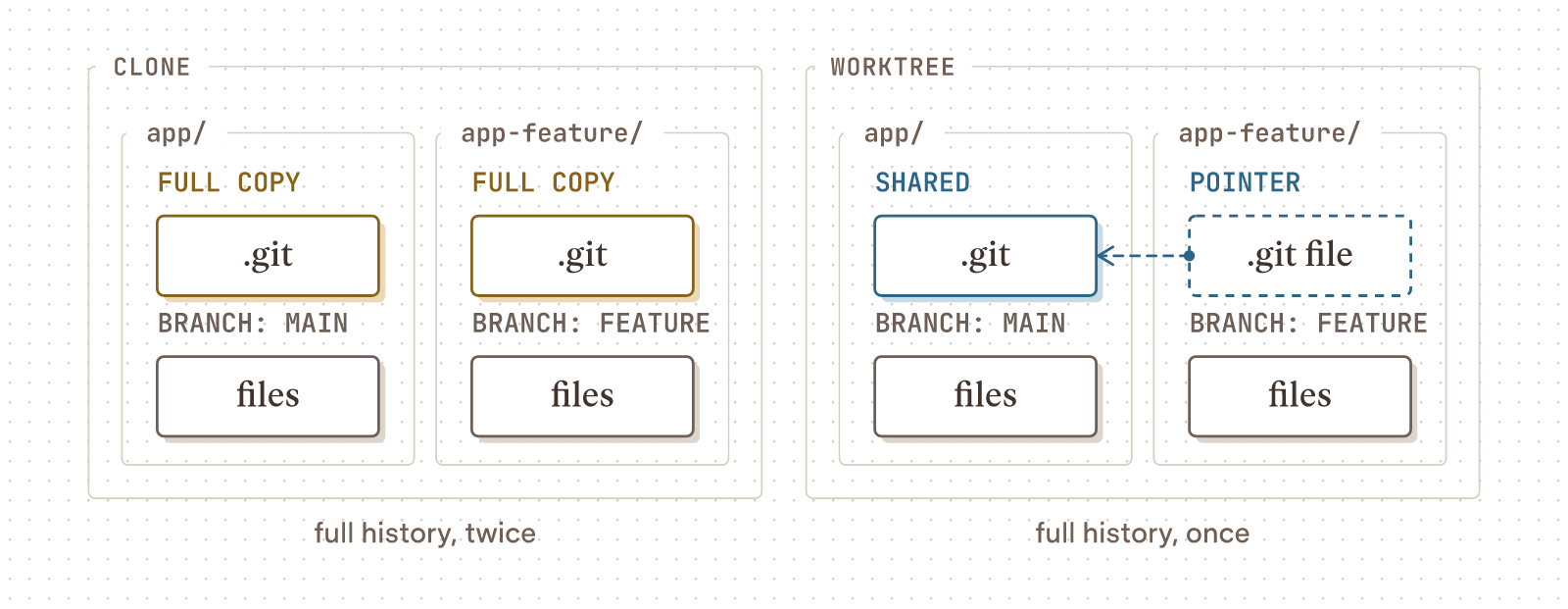
Many AI harnesses now offer native support for worktrees so that a worktree is automatically created per agent. Once an agent is finished, these tools let you merge the changes back into the main repository or create a PR from the worktree to the main branch. Harnesses with native worktree support include Claude Code, Cursor and Codex. If your harness doesn’t support worktrees natively, use a control plane like Paseo or Orca.
Worktrees are only the first layer, though. They isolate files, but each agent still runs as you, with access to your SSH keys and your network. Agents in separate worktrees also still share your machine’s ports and local databases, so two of them running the same app or test suite can collide. Fixing that involves looking at where the agent actually runs.
Sandbox the Agent Instead of Supervising It
The most frustrating feeling is coming back to an agent after letting it run for a few hours, only to find out that it was stuck asking for permission to run an action. I was using Kiro to do some long-running tasks, and it kept prompting me for permission to run even the most basic commands. Fortunately, I was able to fine-tune the permissions allowlist in settings as I went, which helped a lot. But it made me realise how permission prompts are counter to asynchronous work.
Harnesses have tried a few approaches. Some use a predefined allowlist or a lightweight LLM to auto-approve certain actions. Others offer a YOLO mode that skips prompts entirely. Each gets you closer to asynchronous work, but each carries real risk. An allowlist is only as good as your guess about which commands are harmless, an LLM approver can misjudge, and YOLO mode on your own machine gives the agent everything you have.
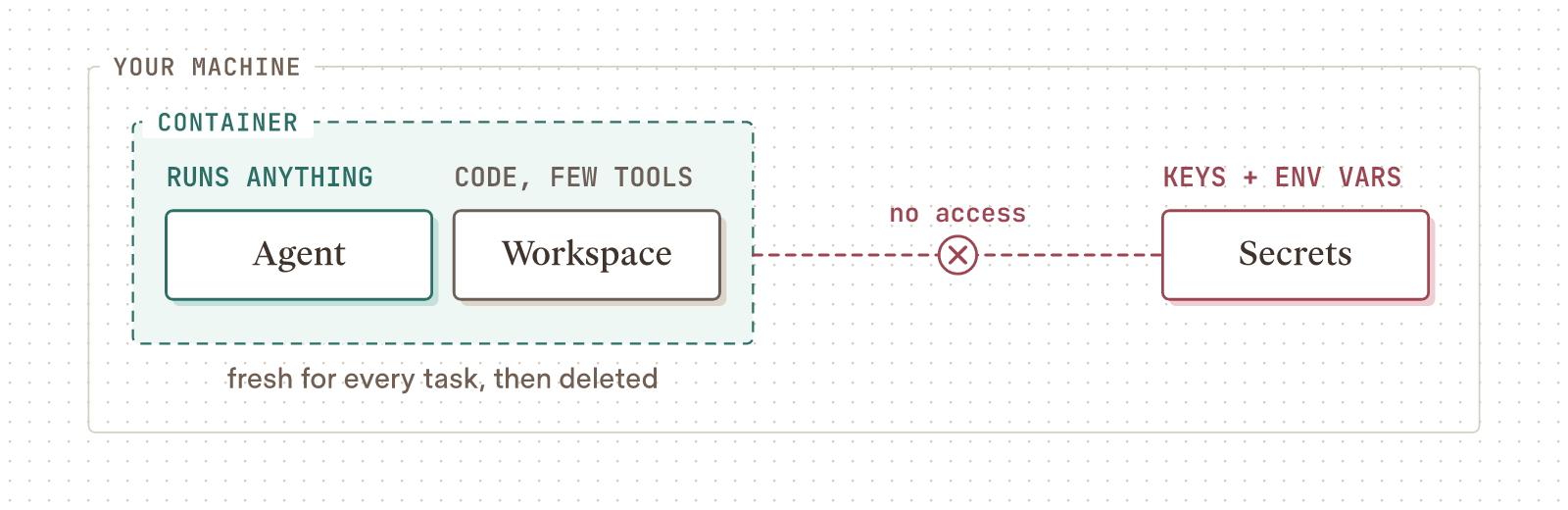
I’ve found the best solution is not to try to restrict what the agent can do, but where it can do it. Give the agent broad permissions inside a sandbox, so that even its worst mistake carries minimal risk. These sandboxes only have the source code and the tools the agent needs to complete its task. If the agent goes rogue, the damage stays inside the sandbox, well away from your sensitive files or data.
Various container tools offer local sandboxed environments for agentic development, like Docker Sandboxes. The container runs on your machine, and your own files and credentials stay outside it unless you deliberately mount them in.
Many harnesses have started adopting cloud sandboxing, especially because it scales well as you run more agents. Tools like Codex, Claude Code, Kiro and Cursor offer ephemeral, isolated cloud environments where a virtual machine with generous compute resources spins up and hosts your agent’s session. Only the code and the task are sent to them, which also means your source code leaves your network. If your organisation restricts that, use a local sandbox or a provider that meets your data requirements. Each session gets its own clone of the repository, so you don’t need worktrees here.
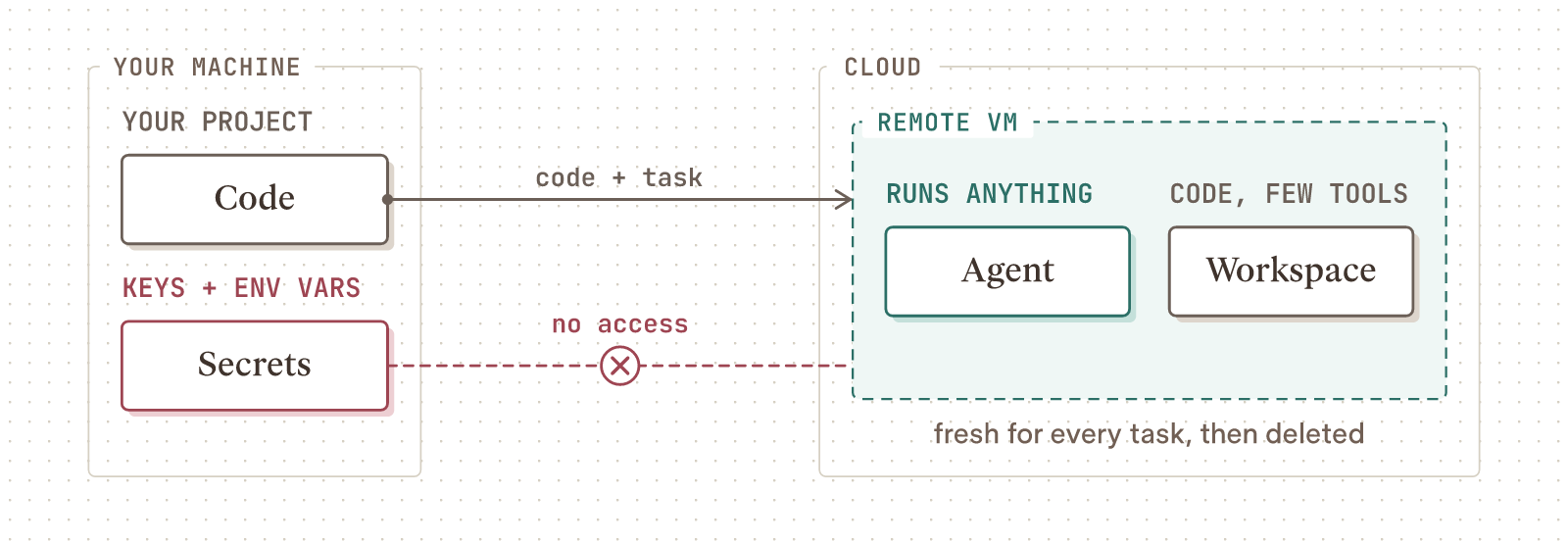
Whichever you use, the sandbox should be fresh for each task and thrown away afterwards, so nothing carries over from one run to the next.
Limit What the Agent Can Reach
A sandbox only helps if you decide what’s inside it and what it can talk to.
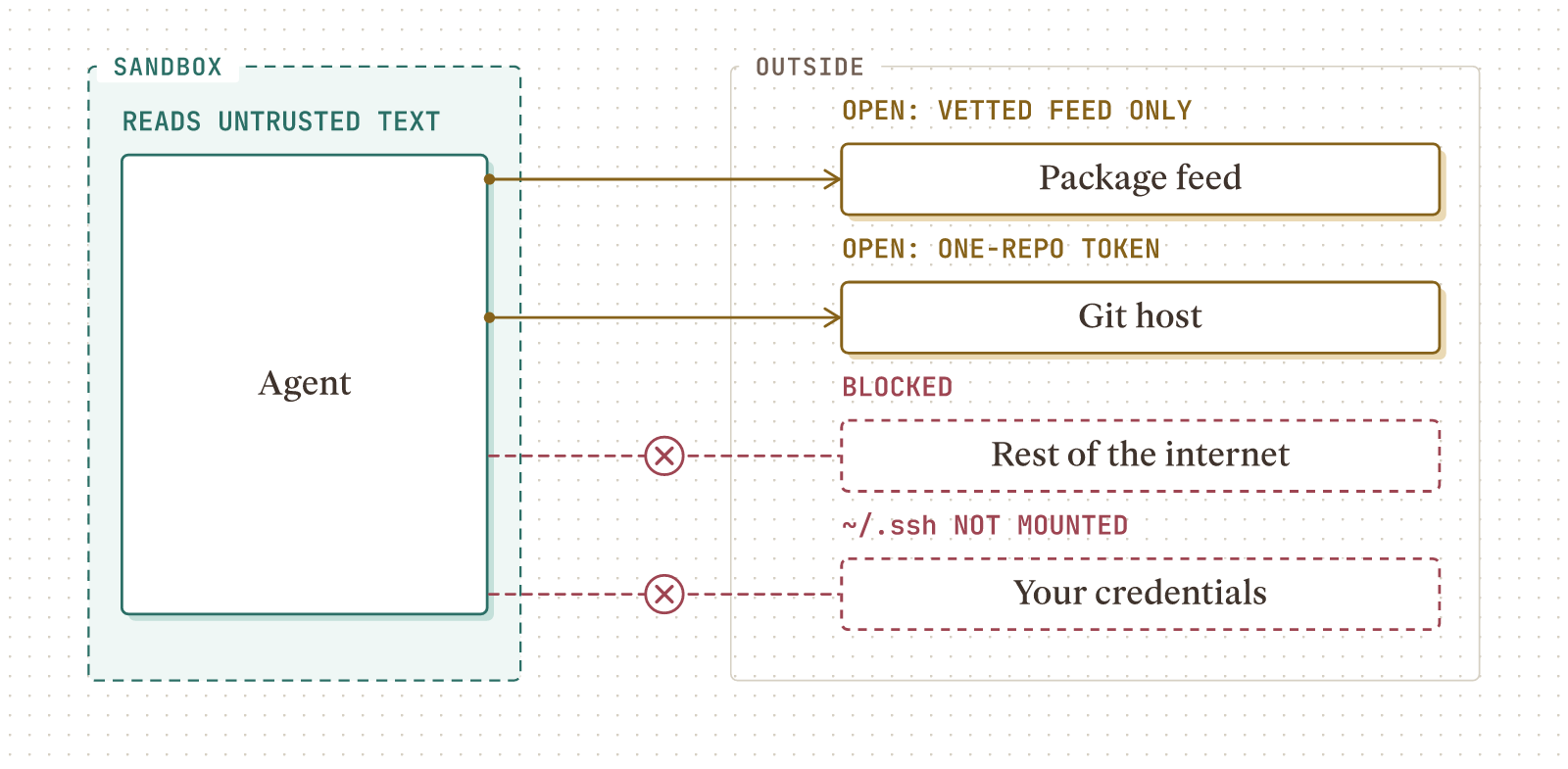
Start with the network. Restrict outbound access to an allowlist, usually just your package feed and your Git host. The reason is prompt injection. Agents read a lot of untrusted text, like issue descriptions, READMEs, web pages and dependency docs, and any of it can contain instructions aimed at the agent. The model can’t reliably tell your instructions from an attacker’s, so you can’t count on it to refuse. What you can do is make sure a hijacked agent has nothing worth stealing and nowhere to send it.
Even a short allowlist leaves channels open. An agent that can push to your Git host can push your code to a repository you don’t control, so give it a token scoped to the single repository it’s working on, with no permission to create or touch others. That token also shouldn’t be able to bypass branch protection or edit rulesets and CODEOWNERS. Another is the package feed, because the public registries are where malicious packages come from. In a corporate setting, running your own package feed matters more than ever. Point the sandbox at an internal feed that only proxies vetted packages and block the public registries entirely.
Leave credentials out of the sandbox too. Don’t mount your ~/.ssh directory in the sandbox! The only credentials your sandbox needs are the ones for your agent provider, the scoped Git token and development secrets for the external dev resources your agent needs, like Supabase. Grant these only when they’re necessary, prefer short-lived credentials over long-lived ones, and scope them so they can’t be used for anything other than the agent’s intended purpose. The dropped database incident from the introduction was possible because the agent could reach the production database. An agent that never holds production credentials can’t drop a production database.
Keep a Record of What the Agent Did
When nobody’s watching, you need a way to see afterwards what happened. Keep the session transcript or logs for each run. When a PR looks wrong, the transcript shows you what the agent was told, what it tried and where it got stuck, and it lets you fix the task or steering file rather than just the symptom. For longer runs, set up a notification for when an agent finishes or is blocked, so you aren’t polling. A stuck agent is far cheaper to unblock in the first hour than at the end of the day.
Let Agents Verify Their Work
Because you’re not monitoring the agent, you need to make sure it knows how to measure its progress towards the end goal and, importantly, know when it’s actually completed the task. Besides defining clear acceptance criteria in the original tasks, there are other mechanisms or sensors you can give the agent to help it.
Test First
Test-driven development is something many developers claim to do but rarely do. Who has time to write every test before touching a line of code? Well, it turns out agents do!
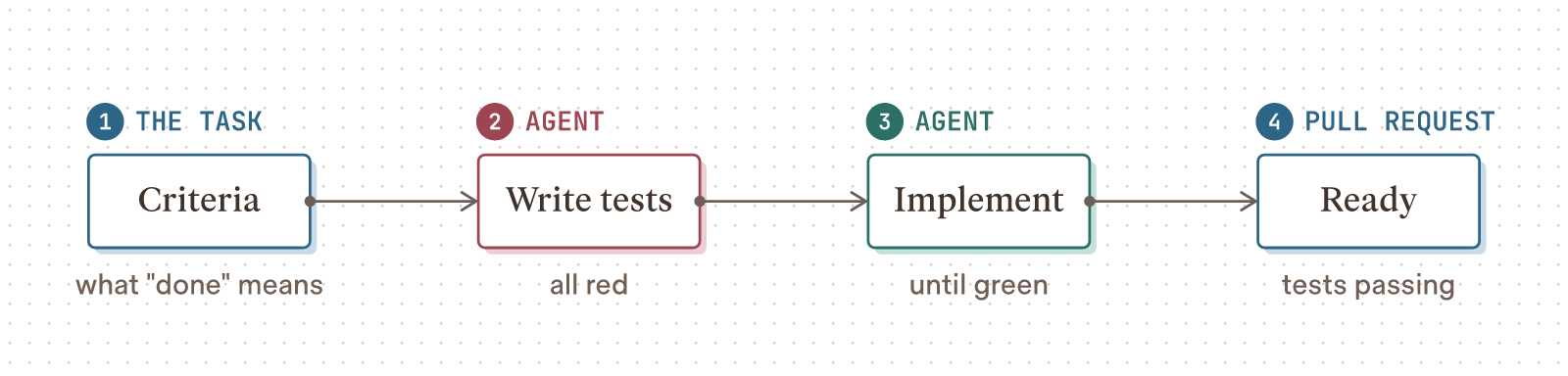
By making agents write the automated tests first, they have a clear measuring stick to know when they’ve completed the task: a red test turning green. The tests are also better when they’re written first. At that point the agent’s context holds the acceptance criteria and very little else, so the tests describe what the code should do and not how the agent happened to implement it.
The weakness is that the agent is marking its own homework. If it misreads a requirement, it writes a test that encodes the misreading and then makes that test pass. Two things help. You can split the work, so that one agent writes the tests from the acceptance criteria and a different agent writes the implementation. A misunderstanding then has to happen twice to get through. And when the PR arrives, the tests are the first thing you read, because they tell you whether the right thing was built. More on that in the review section.
Guiding agents to write tests first is something you can include in your agent definition or skill file. The /tdd skill in Matt Pocock’s skills pack does exactly this.
Build a Test Pyramid
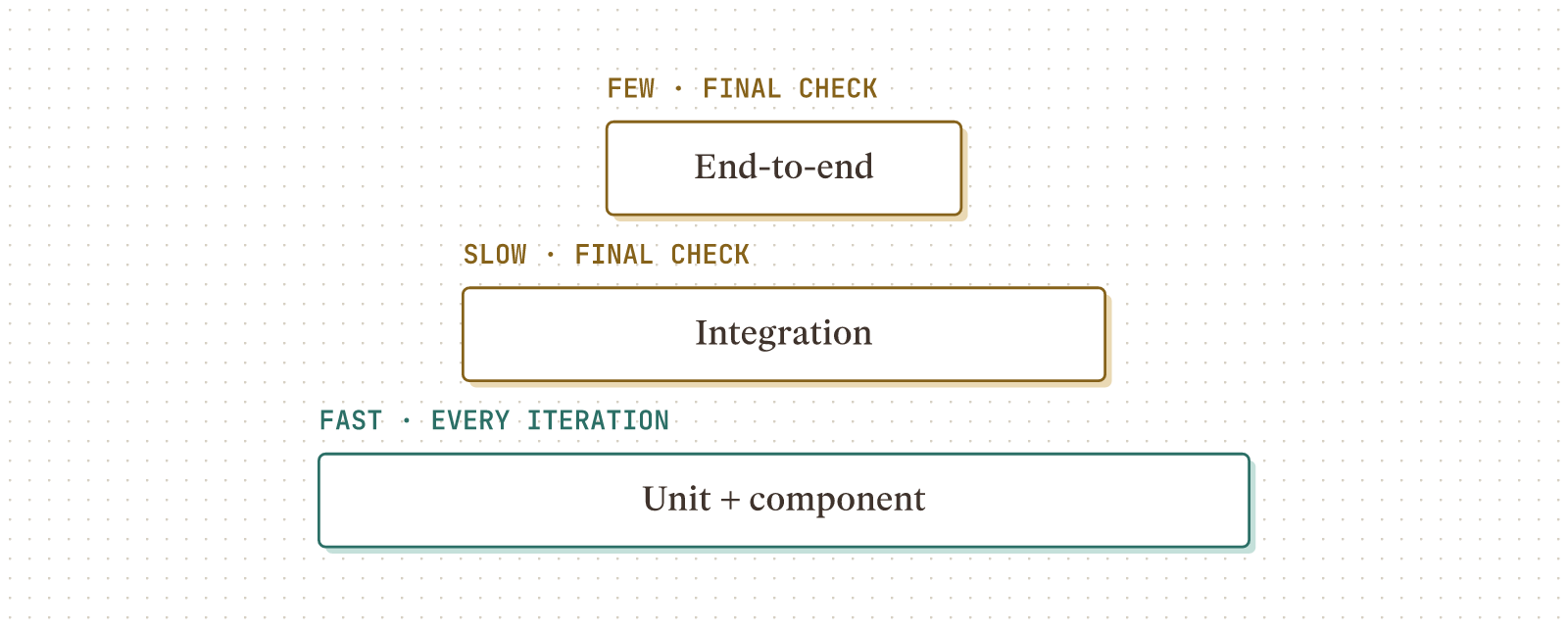
Not all tests are equal. Smaller tests are faster and catch granular bugs in individual methods while larger integration and end-to-end tests catch broader issues and often take far longer to run.
Building a balanced test pyramid involves intentional instructions. Left alone, agents go to extremes. I was working on an Express.js project and found tests for functions that were basically just asserting method calls from the function. The tests didn’t check any logic, only that the function itself made calls to various helper methods. That’s a pointless test. On the flip side, I’ve also seen agents end up with few tests that try to test everything at once and become brittle and hard to maintain. You need balanced tests that cover all the seams and edge cases in your application.
Pay attention to integration tests as well. They’re far more important in agentic development because they catch assumptions and misunderstandings agents might have about the runtime environment, packages or third-party services your application uses. Have integration tests that cover all your integration points.
I found that in larger projects, running the entire test suite as the agent worked took very long. The solution ended up being to split the integration and end-to-end test runs from the unit and component tests so that agents can still iterate quickly with the fast tests and run the slow tests towards the end as a final verification step.
Check That the Tests Test Something
Coverage numbers won’t catch weak tests, because a test that calls a function and asserts nothing useful still counts as covered. The deterministic way to find them is mutation testing. Tools like Stryker, PIT and mutmut make small breaking changes to the code under test, like flipping a condition or removing a statement, and check that at least one test fails each time. Any change that leaves the suite green points at a test that isn’t checking anything.
If no mutation testing tool fits your stack, you can have the agent do a version of this itself. Once the tests pass, have it make small breaking changes, run the suite after each one, and strengthen any test that survives and revert the change. Add this as a final step in your steering file or skill. It’s slower and less thorough than a dedicated tool, and it’s the agent marking its own homework again, so treat it as a fallback rather than a replacement.
Guard the Tests
Tests are one of the most important ways of ensuring the agent’s code doesn’t just look right, but actually does what it needs to do. When tests become a constraint during implementation, agents can try to work around them by commenting them out or modifying the actual test to match the regressed behaviour.
In a particularly lengthy session, where the agent was struggling to complete the task, it ended up rewriting one of the tests to match the regressed behaviour and get the pipeline to go green. It had supposedly exhausted all of its options and felt the need to resort to editing the test itself. Fortunately, it mentioned this fact in the final response and I was able to fix it by investigating myself and giving the agent more context.
Put one rule in your steering file: never remove, skip or loosen a test unless explicitly asked. Then don’t rely on it. Add a deterministic pipeline check that flags any PR that changes or removes existing tests, so the claim “no tests were touched” comes from the pipeline and not from the agent.
Guard your tests. Wrong tests mislead the agent and you might only discover the misunderstandings later once they appear as bugs or missed requirements.
Add Guardrails to Every Pull Request
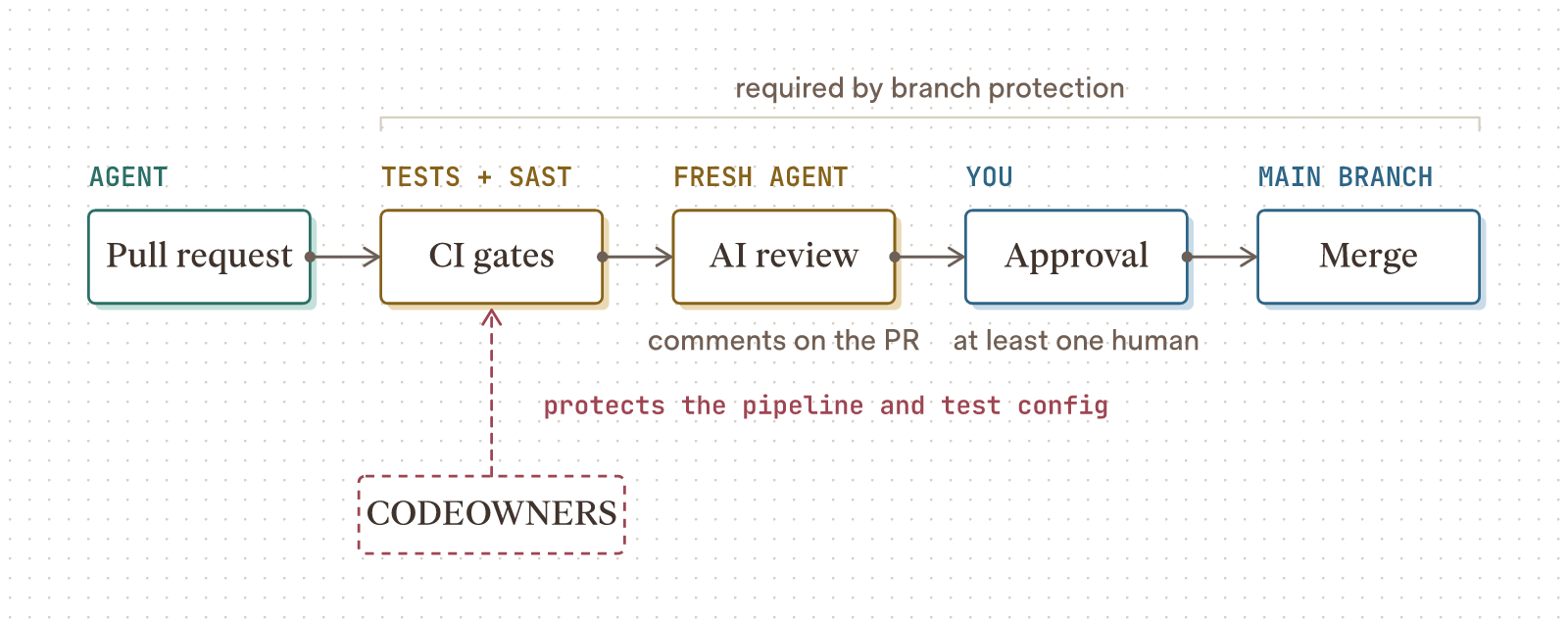
Having strict guardrails on pull requests gives your agents freedom to do whatever they need to on their own branch without accidentally introducing regressions in new code. These guardrails should be run by the CI/CD pipeline and enforced by branch protection rules so that a PR can’t be merged unless it conforms to all the guardrails. Those guardrails include having at least one human approval. No agent, including the one that opened the PR, should be able to merge its own work.
Automated Gates
Automated gates run on every pull request and enforce a minimum acceptable standard for new code. A standard automation gate that every repository should have in place is enforcing automated tests passing. Any failed test indicates a regression or bug that should be fixed, or in the rare event, a test that needs to be updated.
Gates also include linting and code quality checks to ensure the agent’s code is consistent with the rest of the code and follows best practices. Add SAST, like Sonar, and dynamic analysis tools to catch security issues and vulnerabilities before they land in main. Secret scanning is non-negotiable. GitHub’s secret scanning and Gitleaks are two options. Dependency scanning is also vital in the age of AI-powered development, since agents can very easily be tricked into installing a legitimate-looking package that’s actually malicious. Dependency scanning tools like Dependabot flag dependencies with known vulnerabilities.
Keep these gates deterministic. The same change should always produce the same result, so the standard is applied identically to every pull request, whether a human or an agent wrote it. Anything that relies on judgement belongs in the review stage instead.
Protect the gates themselves. The quickest way for an agent to pass a failing check is to change the check: edit the workflow file, relax a lint rule or lower a coverage threshold. Put your pipeline definitions, linter configuration and test configuration under a CODEOWNERS rule, so any PR that touches them needs your explicit approval.
CODEOWNERS only controls what gets merged, though. CI still runs the workflow files from the agent’s branch before anyone approves the PR, so an agent could edit a workflow to read your CI secrets. Don’t expose secrets to workflows that run on pull requests, and give them a read-only GITHUB_TOKEN. Be careful with pull_request_target, which runs with elevated permissions and should never check out and run the PR’s code. Keep deployment credentials in environments restricted to your main branch, so they’re only available after the PR is merged.
AI-Powered Reviews
AI-powered reviews involve dispatching an AI agent to review all code changes in a pull request and suggest improvements or fixes. This agent is separate from the implementation agent so that its context window is fresh and can offer a new perspective on the code changes.
I was implementing a REST API and, because of constraints from the consuming system, I had to implement search query parameters in a particular way so that we could later scale them with different operators and fields. Unfortunately, because this was future expected complexity and not currently used in this codebase, the review agent kept trying to suggest a simpler set of query parameters, even after I closed the initial suggestion with valid reasoning. In the end, I documented it in an ADR in the codebase so that the agent understood the intent behind the design decision.
Ideally, your AI-powered code reviews should run on pull requests and provide feedback in the pull request comments so that there’s an auditable record of the feedback it gave. This feedback can then automatically trigger the implementation agent to address it, or you can have a human reviewer first review the feedback and then trigger the implementation agent if necessary. Some great tools to consider are GitHub Copilot and Claude Code Reviews. If you can’t run your code-review on your PR, have a separate agent run a code review locally on all changes on the current branch before the PR is merged. The fresh context will help pick up missed issues.
There are a number of different strategies for running code reviews. Matt Pocock’s /code-review skill is a great two-pronged approach that performs a spec review and a standards review. Try different ones to figure out what works best for your team and codebase.
Review the Pull Request
Most of your time will be spent planning the work and then reviewing the pull request afterwards. This is the most important step in the process.
It’s also where the limit on how much you can delegate shows up. Running more agents in parallel doesn’t speed up the review, which you still do yourself. In my experience, I could manage four to six agents at once when each was making small code changes. With larger changes, I couldn’t keep up with more than two before PRs started queuing. If agents produce PRs faster than you can review them, the extra agents only create a queue. Keep changes small and add agents only as fast as you can review their work.
You are still the owner of the change. It doesn’t matter if you managed to get an agent to implement it for you, your name still goes on the merge commit. Holding an agent accountable for the change is like blaming your IDE’s autocomplete for suggesting the wrong method. It’s your responsibility to ensure the change is actually implemented correctly.
However, when reviewing the pull request, there are things you can do to streamline the process and minimise reading.
Have the Agent Write Clear Descriptions
There’s nothing worse than opening a PR with no description or a generic template. Or, possibly worse, having an agent write a novel about the changes it made. The constant reading drains me! I finally settled on an inverted pyramid approach to PRs where the most important information was presented first and then explained further down.
This resulted in my PRs having the following sections:
- What the original intent of the change was and what approach was taken to implement it
- A walkthrough of the changes made
- Whether the change is a breaking change or not
- Steps that would need to be taken to reverse the change once in production
These points help you orient yourself in the PR quickly and understand what the change is about. The description should be concise so that you can quickly scan it.
For the most consistent PRs, create a template for the PR along with a skill or custom agent that combines the template with instructions on how to write each section in the template.
Ask for a Code Walkthrough
Agents are great at updating related docs with the code. Unfortunately, I found that all these peripheral file changes made PRs feel overwhelming and it was difficult to know what were the important files that needed to be reviewed. I found a code walkthrough was a great solution. This walkthrough bridges the gap between the intent of the change and how it was actually implemented. It should literally read like a story, explaining the process and reasoning behind the changes that were made.
Below is a simple walkthrough of changes made in a PR for adding payment functionality to the invoice domain:
Domain/Invoices/Payment.cs: Added the Payment entity. It enforces that a payment’s amount equals the invoice’s outstanding balance, using exact decimal comparison with no rounding tolerance. Domain/Invoices/Invoice.cs: Added a RecordPayment method that moves an invoice from Sent to Paid. It rejects draft and already-paid invoices here, so the rule lives in the domain and not in the layers above it. Application/Payments/RecordPayment/*: Added the RecordPayment command and handler. The handler loads the invoice, calls the domain method and saves the result, with no business rules of its own. Api/Endpoints/PaymentsEndpoints.cs: Added POST /invoices/{invoiceId}/payments, which returns 201 on success, 404 when the invoice doesn’t exist, and 422 when the invoice is a draft, is already paid, or the amount doesn’t match the balance. Tests and migration: Added unit tests for the domain rules and integration tests for the endpoint against a real database. The AddPayments migration creates the Payments table and doesn’t alter any existing tables.
- Domain/Invoices/Payment.cs: Added the Payment entity. It enforces that a payment’s amount equals the invoice’s outstanding balance, using exact decimal comparison with no rounding tolerance.
- Domain/Invoices/Invoice.cs: Added a RecordPayment method that moves an invoice from Sent to Paid. It rejects draft and already-paid invoices here, so the rule lives in the domain and not in the layers above it.
- Application/Payments/RecordPayment/*: Added the RecordPayment command and handler. The handler loads the invoice, calls the domain method and saves the result, with no business rules of its own.
- Api/Endpoints/PaymentsEndpoints.cs: Added POST /invoices/{invoiceId}/payments, which returns 201 on success, 404 when the invoice doesn’t exist, and 422 when the invoice is a draft, is already paid, or the amount doesn’t match the balance.
- Tests and migration: Added unit tests for the domain rules and integration tests for the endpoint against a real database. The AddPayments migration creates the Payments table and doesn’t alter any existing tables.
The walkthrough highlights the important files and what changed in each. It also shows how the change was implemented and where the important logic sits.
Read the Tests First, Skim the Rest
You’re accountable for the whole change, but that doesn’t mean every file needs the same attention. Review depth should follow risk, not diff size. A five-line change to authorisation deserves more scrutiny than five hundred lines of generated wiring, and reading every line of the latter erases most of the productivity gains agentic development brings.
The walkthrough tells you where to look, but it was written by the agent whose work you’re reviewing. Treat it as a claim to check against the diff, not as a map to trust. An agent won’t always admit in its summary that it “loosened a test to make this pass”.
Some parts of a PR always get read in full, whatever the walkthrough says:
- Tests. Read these first. They tell you whether the right thing was built, and if the tests are wrong, a green pipeline means nothing.
- Domain and business logic. This is where a misunderstanding of the requirements shows up.
- Migrations. A wrong migration can lose data, and you can’t fix that with a follow-up PR.
- Authentication and authorisation code.
- Dependency changes. Each new dependency needs to be scrutinised.
- Pipeline and tooling configuration. These are the gates everything else relies on.
The rest you can glance over: wiring, boilerplate, generated code and documentation. You’re looking for code that blatantly violates your standards and for files that shouldn’t be in this change at all. Small issues and nitpicks in those files are what your AI reviewer and analysis tools are for.
One more way to save time is to ignore PRs where the automated gates are failing. The code is going to change, so have the agent fix the gates first and then do your review. If the checks keep failing after the agent investigated it, consider whether you need to give the agent more context or correct an assumption it made.
Conclusion
None of this removes you from the work. It changes what the work is. You spend less time typing code and chasing small bugs, and more time deciding what gets built, how it’s structured and whether what came back is right. That makes good architecture matter more than it used to. Agents multiply whatever code already exists, so a codebase that’s hard to navigate gets worse at the speed your agents work.
The setup for asynchronous agents takes effort, but you only do most of it once. To start, pick one feature, write the ticket properly, dispatch an agent in a sandbox and deliberately don’t watch it work. Then review the PR and practise giving feedback the agent can act on.
Skip the setup and you should expect bugs and security vulnerabilities. Put the rules in place, though, and walking away from your keyboard stops being reckless. It becomes a deliberate, repeatable way to work.