 AIFeed
Title: 李飞飞's Latest World Model Is Now Open to the Public — I Built a Chongqing Mountain City With a Single Sentence
Body:
李飞飞's Latest World Model Is Now Open to the Public — I Built a Chongqing Mountain City With a Single Sentence
2026-11-13 18:04
The 李飞飞 world model that previously went viral for "generating an entire 3D world from a single image" is finally open to everyone.
Just today, World Labs, founded by "AI godmother" 李飞飞, officially opened its world model Atlas, launching a web app and a developer API at the same time. New users get 10,000 credits upon registration.

Try it at: atlas.worldlabs.ai
Now we can also experience firsthand a capability once seen only in demo videos: sketch a few houses and a small path, and AI can turn the sketch into a freely explorable 3D world. You can even adjust the scene layout, plan camera shots, generate video, and finally export to Blender or a game engine for further work.
This launch also brings two new web apps, Viewfinder and Chisel, which you can try directly on the Atlas website.
李飞飞 reposted World Labs' announcement tweet and could hardly contain her excitement, saying "Atlas is now open to everyone!! I'm so excited to see what users will build with our latest world model! 🤩🌎"

a16z partner Martin Casado also gave this release extremely high praise, calling it the biggest step in 3D generation/reconstruction since the rise of generative AI.

A Complete World Model Toolchain
Logging into Atlas requires phone verification. In our test, a +86 phone number received the verification code normally, but when choosing your region afterward, remember to select the United States or Canada to ensure a smooth experience.
After new users log in, the homepage shows four tools: Viewfinder, Chisel, Relight, and Splat to mesh. They sound like very professional terms, but they are really implementing the complete engineering pipeline of a "world" from generation onward.
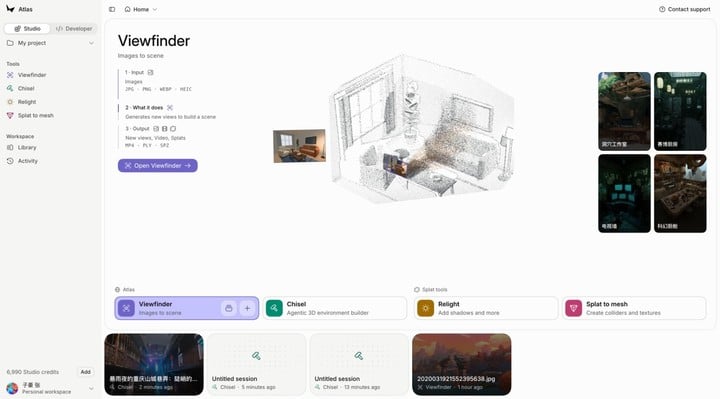
Viewfinder's role is to go from image to scene. Give it a photo or an AI-generated image, and it can build a scene, letting us explore new viewpoints, set camera paths, and render video. Images originally fixed in a picture can now be reframed.
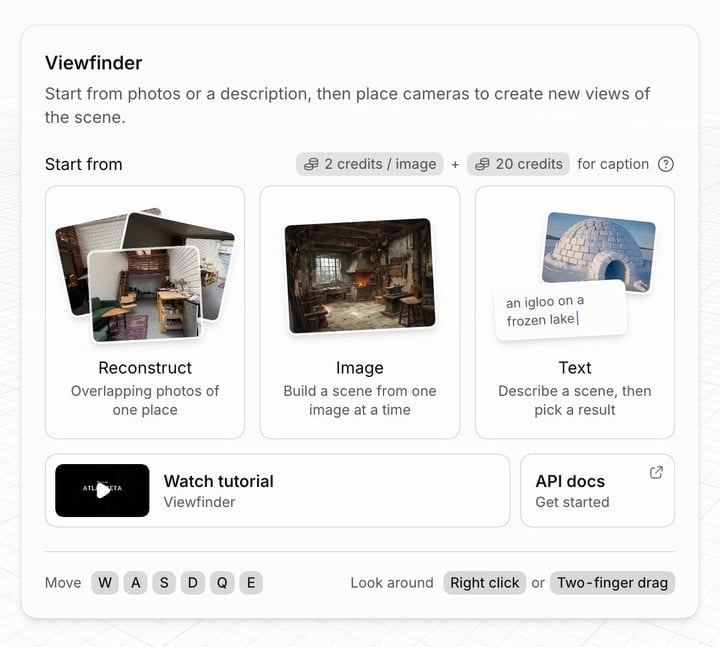
For example, a picture of a living room can become the starting point for Viewfinder. What we want to see might be the view from the window toward the sofa, or a shot slowly moving through the room.
But the photo didn't capture the back of the sofa, so the model needs to infer what it looks like there; how much space exists beyond the frame also needs to be filled in. Viewfinder expands from a single image and generates an extensible scene containing a great deal of imagination.
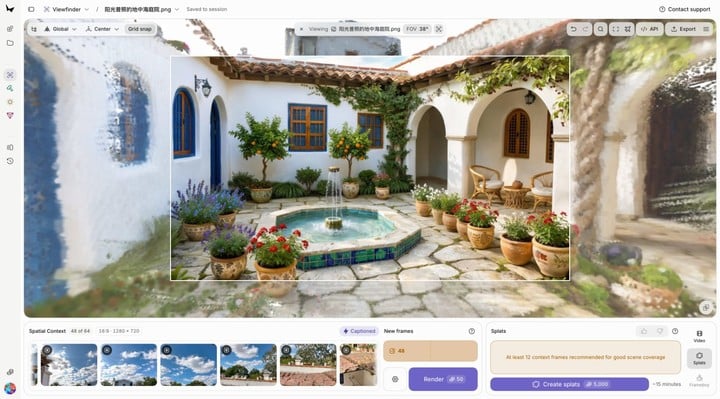
If you want to reconstruct a place that exists in reality, you need to provide more viewpoints. The official documentation also notes that Viewfinder supports generating scenes from a single image, and can also use up to 64 inputs to reconstruct a real environment.
But creation soon runs into the next problem: the generated room does look good, but its layout doesn't match the shooting needs.
For example, the sofa is too far from the window, the hallway is too narrow, and the desired shot simply can't fit. That's where the second tool, Chisel, comes in. We can first build the scene structure with simple 3D shapes and determine the positions of objects, then let the model generate the visuals based on these structures.
We can think of it as a simplified set build: first decide where the walls are and how the furniture is placed, then consider materials, lighting, and overall style. In the demo, a World Labs developer summarized this workflow as building the space first, then freely adjusting the visual style while keeping the walls in place.
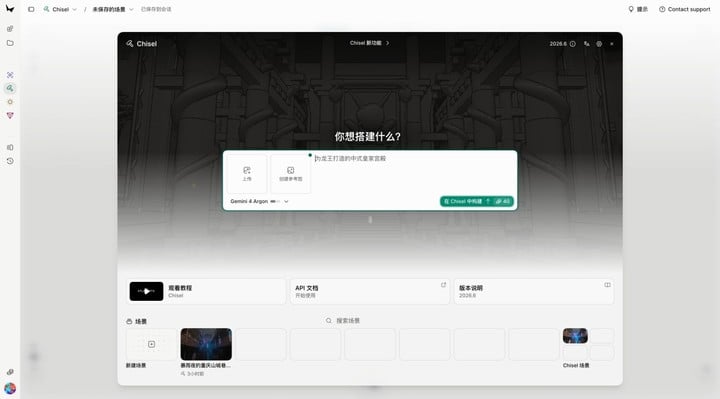
Overall, the four tools basically implement all the capabilities a world model needs.
- Viewfinder: image → scene. Input JPG/PNG/WEBP/HEIC to generate new viewpoints (MP4) or Gaussian splat point clouds (PLY/SPZ).
- Chisel: an agent-driven 3D environment builder. Supports mixed input of images, documents, web URLs, and mesh models (GLB/glTF/OBJ/FBX); use natural language to direct the AI to build a white model, and then Atlas renders images and splats.
- Relight: re-light a splat scene and add shadows.
- Splat to mesh: convert splat point clouds into textured GLB meshes, directly compatible with game engines.
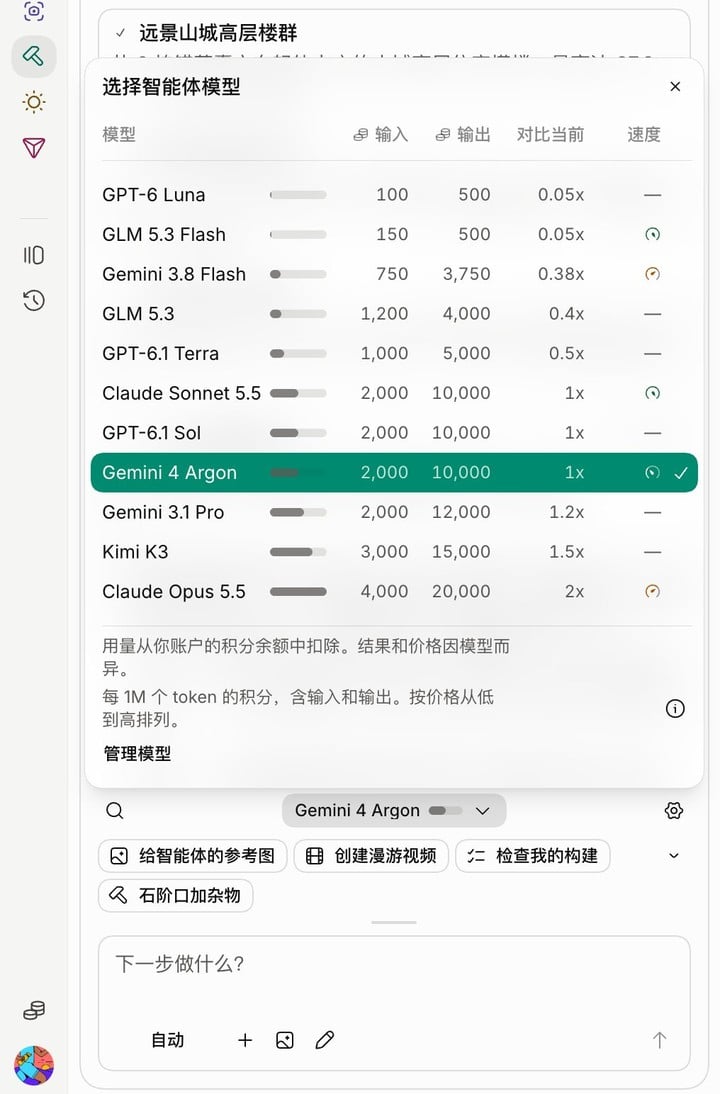
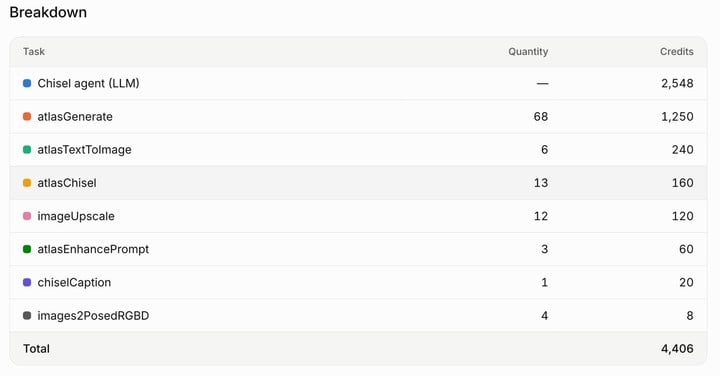
Currently, the entire platform uses a credit system: Viewfinder renders one frame for 50 credits, Chisel's agent is billed by token (Gemini 4 Argon, 10,000 credits per 1M output tokens), a full Chisel render costs 160 credits, and generating a complete Splat costs 5,000 credits.
In Viewfinder, each image we generate costs 50 credits; the larger credit expenses are in rendering and video generation. The 10,000 credits from the free plan are still enough to briefly try out the various features of Atlas, the new model.
Hands-On With Atlas: Rebuilding a Chongqing Mountain City
Among the several official demo cases, the most widely shared one is probably turning a casual doodle in a notebook into a 3D scene you can walk into.
We also had AI generate a sketch. On this notebook doodle there are small houses, a big tree, a smiling sun, and a winding path, which we then uploaded to Chisel to initialize the entire scene.
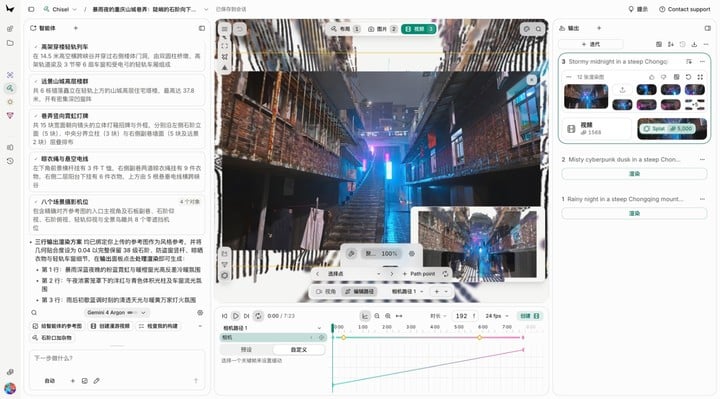
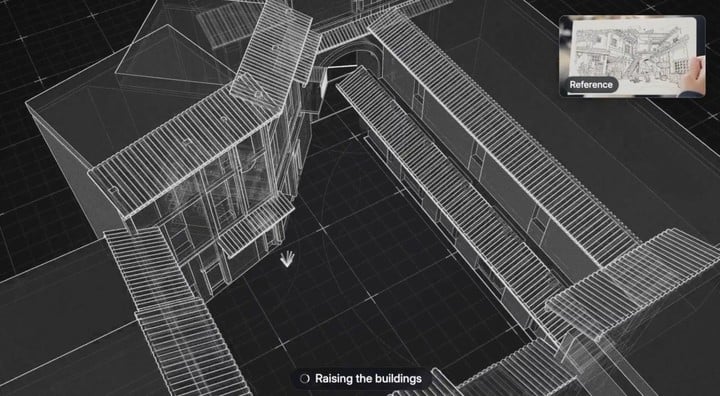
After clicking "Build in Chisel," the system first generates a reference image, and then the built-in agent starts automatically building the 3D white model. We can watch in real time as it breaks down building volumes, adds doors and windows, puts up signs, places camera positions, and automatically checks for and fixes geometric errors such as floating and intersecting objects.
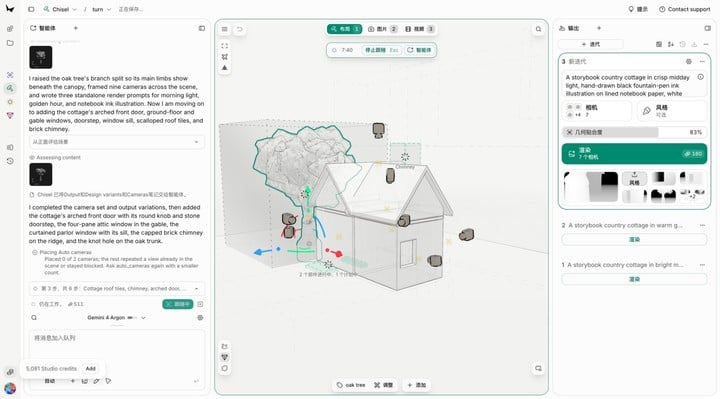
In the agent dialog box on the left, we can further adjust the 3D building process. Once building is complete, the agent delivers the scene, multiple unobstructed camera positions, and several rendering schemes covering different times, weather, and atmospheres.
Open the output panel on the right, choose a scheme, and click "Render" (about 160 credits) to generate final images for all camera positions at once.
If you want to keep working on it, you can add instructions to the agent, such as "add a late-night food stall," or click "Create Video" to generate a walkthrough video, or generate a complete Splat and then roam 360° in the viewport.
Finally, use Relight to adjust the lighting atmosphere, or use Splat to mesh to convert it into a GLB and export it.
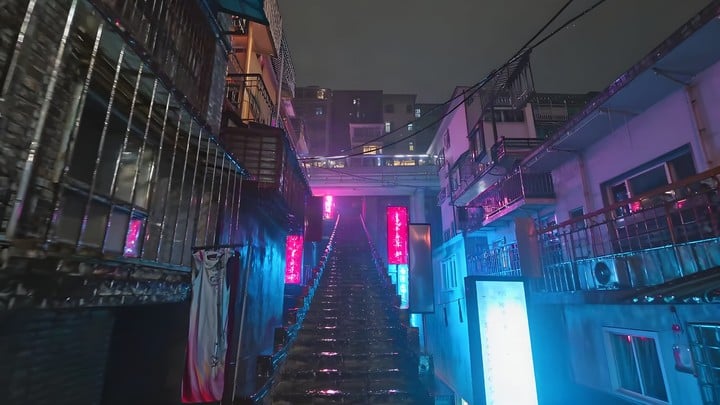
We also tried entering a prompt: "A Chongqing mountain city alley on a stormy night: steep stone steps descending, flanked by layered old residential buildings covered with neon signs and clotheslines, the wet stone-paved road reflecting pink-blue light, and in the distance a light rail train passing straight through the middle of a building."
In about 1 minute, Atlas first generated a reference image containing stone steps, tube-shaped apartment buildings, neon lights, clotheslines, wet-road reflections, and a train passing through a building.
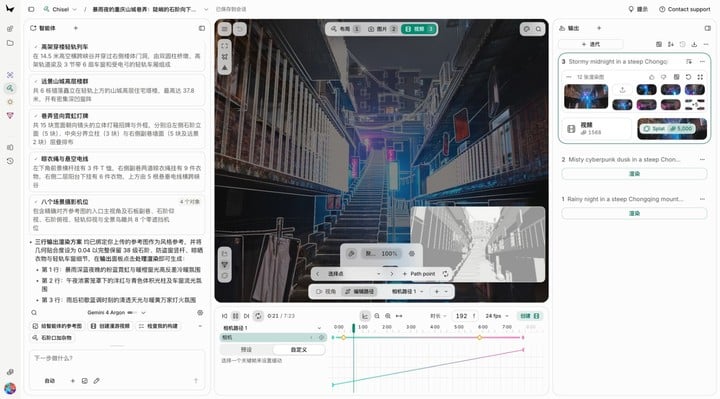
Chisel's built-in agent (Gemini 4 Argon) took over the subsequent building, automatically formulating and executing a 6-step plan over about 30 minutes.
These included breaking down building volumes → placing 9 camera positions → building the through-building light rail and distant building clusters → adding balconies, security grilles, and corrugated awnings → placing 15 neon light boxes and clotheslines → verifying sightline occlusion shot by shot.
李飞飞’s latest world model is now officially open—I built a Chongqing mountain city with a single sentence
The system continuously and automatically checks for geometry errors such as “floating,” “intersecting,” and “camera occlusion,” and when it detects issues like “light rail pier floating 8.25 meters,” it repairs them on the spot. The agent’s reasoning process also shows that this set of tools is genuinely professional—it will say, “Reduce the eave heights of the foreground and midground buildings to reveal an unobstructed view of the light rail passing through the building.”
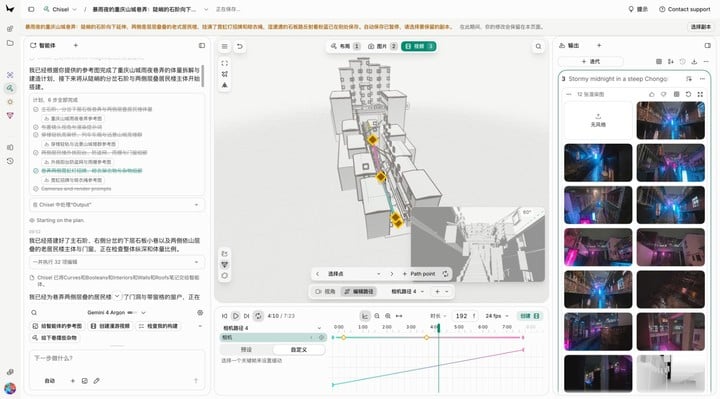
The final scene contains 38 stone steps, 5 setback residential buildings on each side, 3 light rail cars with pantographs, and 8 unobstructed camera positions.
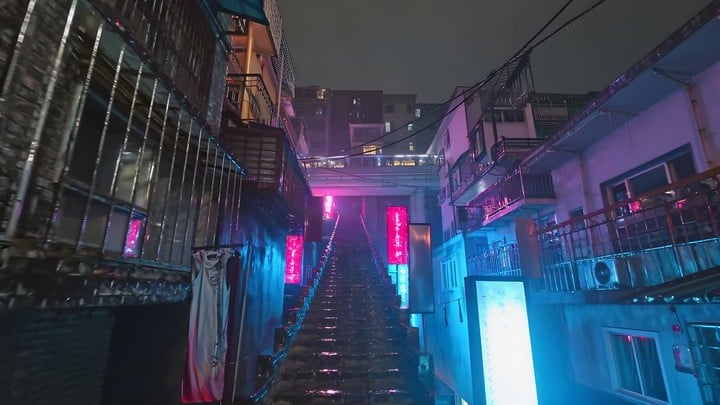
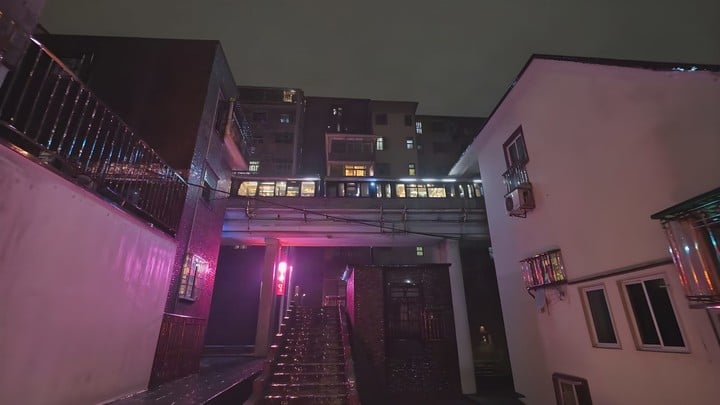
We chose one of the “heavy rain deep-blue night” rendering schemes (160 credits), and all 12 camera positions were rendered at once: reflections of pink-blue neon on the wet, slippery stone steps, security window cages on the brick walls, and T-shirts drying on a line—all present.
The fastest way to get started with Atlas is still to use Viewfinder. Click “Drop or click” to upload an image (JPG/PNG/WEBP/HEIC supported), and